
In plain English: Seller Central becomes the single screen where you run every store you sell on, not just Amazon.
What Are Amazon Multichannel Selling Tools?
Amazon Multichannel selling tools turn Seller Central into a control panel for every store you sell on. Instead of logging in to Amazon, then Shopify, then Walmart, then eBay or TikTok Shop, you manage listings, orders and profit in one place.
The routine is familiar to any multichannel seller. Each platform has its own dashboard, its own rules, and its own way of hiding the numbers you need. By month end, someone is merging spreadsheets just to answer a simple question: are we making money, and where?
On September 24, 2026, Amazon announced the tools to solve exactly that. This guide explains what Amazon multichannel now includes, what it costs, how it compares with existing software, and how to prepare your catalog before it reaches your account.

Why Is Amazon Building Multichannel Selling Tools?
Amazon is building them because most of its important sellers already sell elsewhere. According to Amazon, more than 95% of independent sellers in its store sell on more than one channel, and independent sellers account for over 60% of sales in Amazon’s store.
Amazon has moved in this direction for years. Multichannel Fulfillment (MCF), Amazon Warehousing and Distribution (AWD) and Buy with Prime already let sellers use Amazon’s logistics network for orders placed elsewhere. The new Amazon Multichannel selling tools extend that idea from shipping to the whole business.
The logic is simple. If sellers will be multichannel either way, Amazon would rather be the hub they work from than one more tab they have to check.
What Do Amazon Multichannel Selling Tools Actually Do?
Amazon Multichannel selling tools do three jobs: publish listings once across channels, show every order on one screen, and report profit per product across channels. Amazon’s announcement describes setup of the Amazon Multichannel selling tools as a few clicks from the multichannel settings page.
1. Listings you only write once
Editing a product description once on the Manage Products page updates every connected channel, reformatted to fit each one. Amazon says its AI listing tools will also generate titles and product details tailored to each channel.
Picture a brand with 250 products across three marketplaces and its own store. A bestseller’s packaging changes. Someone must find every live listing, edit each, and confirm the change went through. Miss one and an outdated detail stays live, which invites returns and bad reviews.
Amazon reports that independent sellers created more than 12 million sales-ready listings with its generative AI tools in 2025. Extending that to other marketplaces through Amazon Multichannel selling tools could save hours for any seller with a large catalog.
One caution applies. Writing a listing once does not mean ignoring each marketplace. Shoppers search differently on TikTok than on Walmart, and each platform has its own rules on claims and categories. The tool saves typing; the review is still yours.
2. Every order on one screen
The Manage Orders page pulls unshipped orders from every connected channel, with order details, customer information and fulfillment options together. Amazon’s example is a seller of phone cases on Amazon, Shopify and Walmart who picks a Shopify order and fulfills it through Amazon.
The system then creates the shipment, and tracking flows back to Shopify automatically. You do not have to ship everything through Amazon for this to help, because seeing every order in one place means fewer missed or delayed orders.
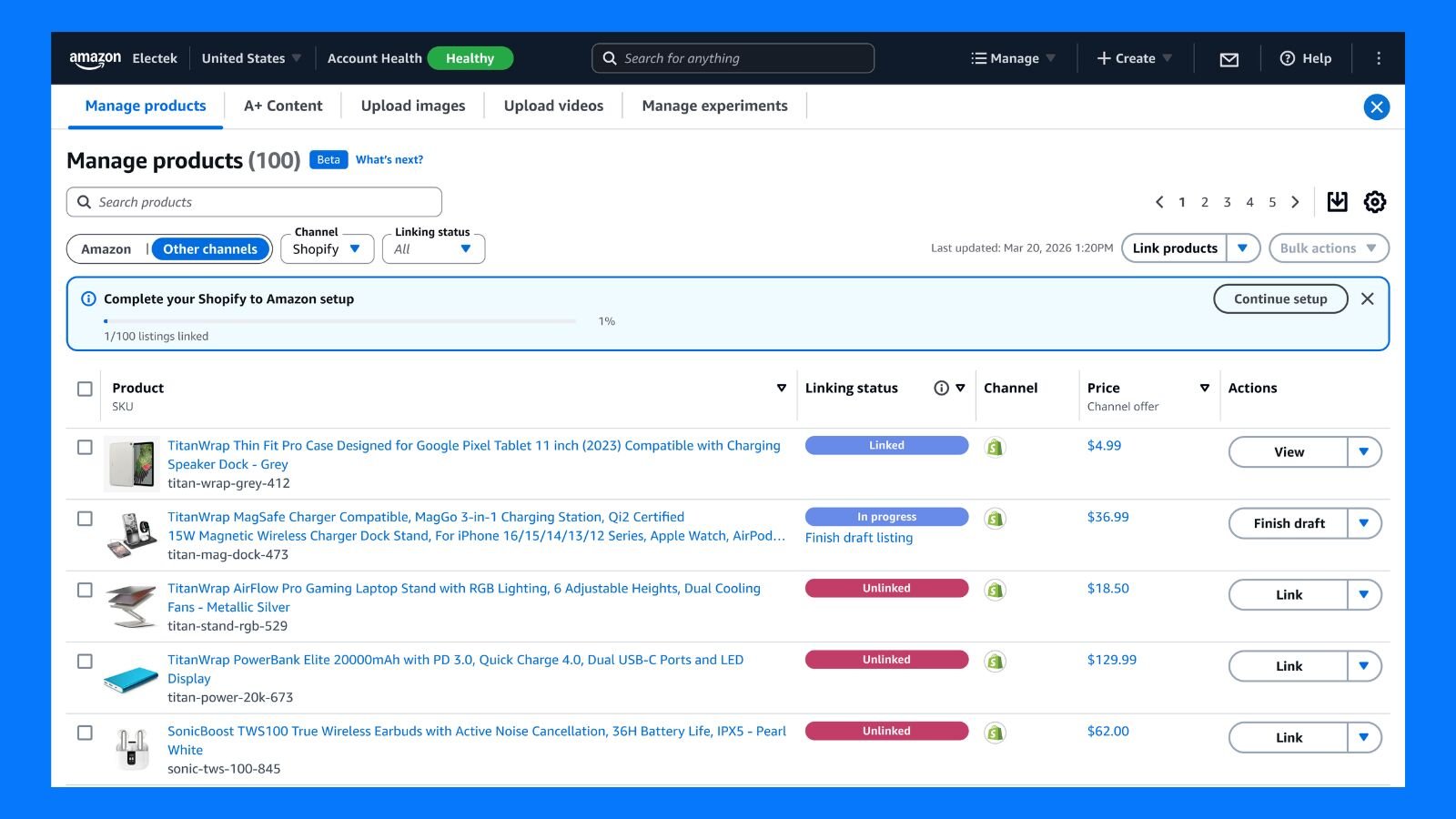
Seeing every order is not the same as syncing inventory perfectly. If stock counts lag, you can sell the same unit twice on two channels. Check which inventory updates your connected accounts support, and keep clear rules for reserved stock, reorder points and returns.
3. A clear view of what is profitable
The profitability dashboard shows earnings per product across channels and brings in ad spend, traffic and sales data from connected platforms. For growing businesses this may be the most valuable piece, since most sellers work out profit by exporting reports and reconciling them by hand.
Amazon shared a comment from Pamela Lee, director of digital operations at Elizabeth Mott. Her three-person reporting team spent about five hours each month logging in to every channel to pull numbers together. With the dashboard, they compare Amazon, Shopify and Walmart in one view.
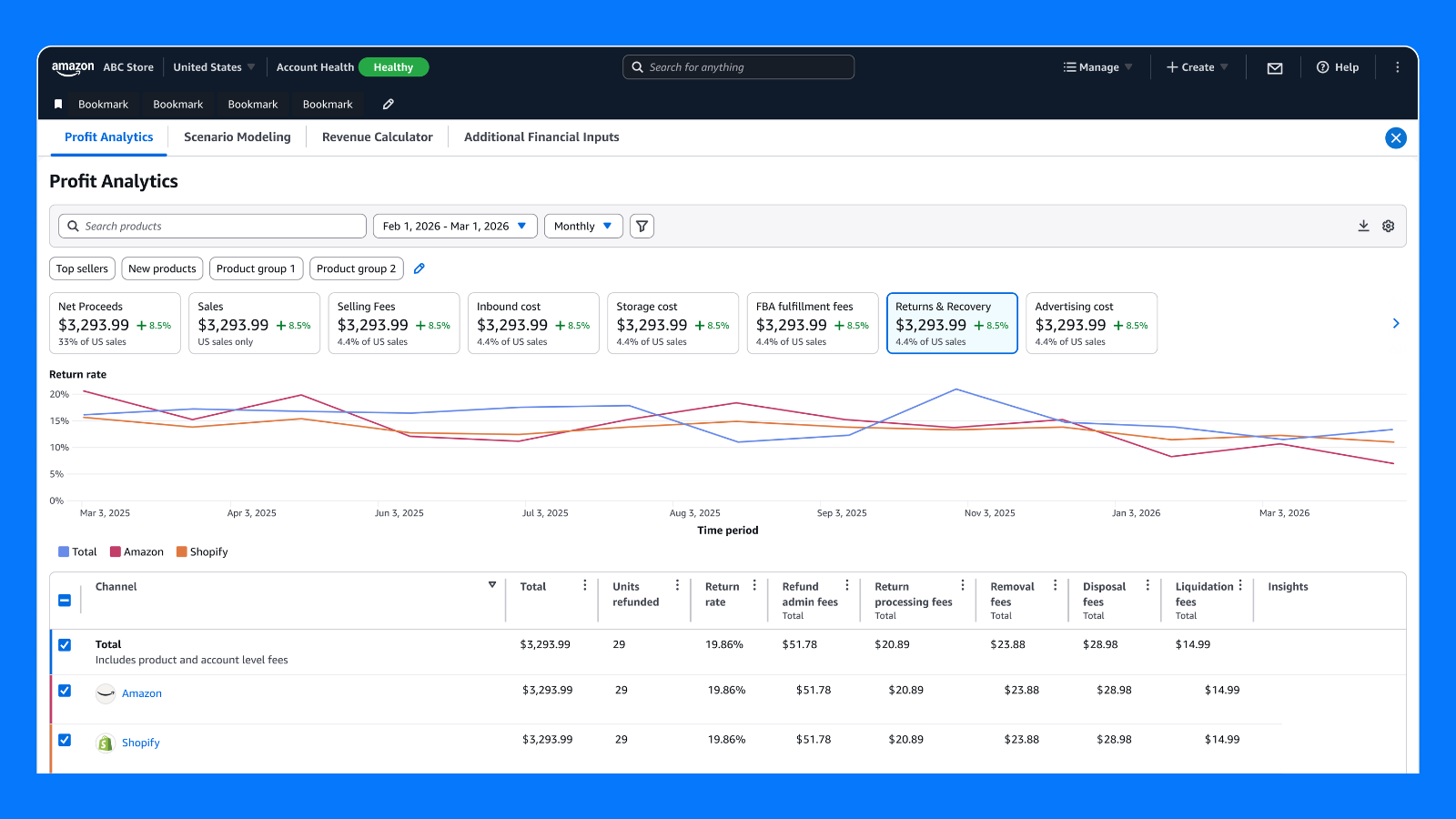
Five hours a month may not sound dramatic, but faster numbers lead to faster decisions on ads and inventory. Amazon’s announcement uses future tense for some profitability and AI listing features, so confirm what is live in your account. A dashboard is also only as complete as the costs it captures. Product cost, storage, inbound shipping, refunds and promotions may not all appear, so check the figures against your real cost structure before changing prices or budgets.
How Do Amazon Multichannel Selling Tools Handle Your Data?
Amazon says sellers decide which channels to connect and what data to share, and can disconnect at any time. It also says off-Amazon data is used only to help the seller manage their business.
According to the company, strict access controls stop that data being shared with other sellers or used to guide Amazon’s own retail decisions. Amazon’s announcement does not describe those controls in detail.
These are strong commitments for Amazon Multichannel selling tools, but read the terms before connecting everything. Private-label sellers whose products compete with Amazon’s own lines should be especially careful. Connecting a store to a competitor’s platform is a significant step, so start with one channel.
Who Gets Amazon Multichannel Selling Tools, and What Do They Cost?
Sellers in the U.S. store get Amazon Multichannel selling tools first, in a gradual rollout over the coming months, at no additional fee. Amazon has given no firm dates, so access may differ from one account to the next.
| Question | Answer |
|---|---|
| Who gets it | Sellers in the U.S. store, rolling out gradually over the coming months |
| Cost | No additional fee, though services like fulfillment keep their own charges |
| Channels now | eBay, Shopify, TikTok and Walmart, with more planned |
| Where to find it | Multichannel settings page, under the Settings menu in Seller Central |
The current version covers connecting accounts, importing and linking off-Amazon listings, viewing multichannel sales and orders, and fulfilling across channels. Amazon says more features are coming to its multichannel selling tools. Sellers outside the U.S. should not assume it is live for them.
How Do Amazon Multichannel Selling Tools Compare With Other Software?
Amazon’s offer of multichannel selling tools wins on price and its direct link to Amazon fulfillment. Specialist platforms still cover far more channels and offer deeper controls, so many sellers will use both.
Amazon is not entering an empty market. Several third-party platforms already do much of what Seller Central now promises:
| Tool | Known for | Typically suits |
|---|---|---|
| Rithum (formerly ChannelAdvisor) | Enterprise marketplace management across hundreds of channels, plus retail media and dropship tools | Large brands with big catalogs and budgets |
| Linnworks | Order, inventory and warehouse automation across 100+ channels | Mid-sized, inventory-heavy sellers |
| Sellercloud | Broad marketplace coverage plus warehouse management on subscription pricing | Larger sellers running their own warehouses |
| Sellbrite | Simple centralised listings and orders | Small sellers on Amazon, eBay, Walmart and Shopify |
| Ecomdash | Cloud-based inventory and order management across channels and fulfillment centers | Small and medium-sized retailers |
| Veeqo | Amazon-owned shipping and multichannel inventory tool | Amazon-focused sellers watching costs |
| Feedonomics | Product feed optimisation for marketplaces and ad channels | Brands focused on listing quality and ads |
| CedCommerce | Marketplace connectors for store platforms like Shopify and BigCommerce | Store owners adding marketplaces |
Rithum is widely seen as powerful but expensive, often sold on annual contracts. That is one reason alternatives like Sellercloud, Sellbrite and Ecomdash found their own audiences. Pricing and features change often, so confirm current details with each vendor.
For many sellers the realistic choice is not one or the other. Seller Central may handle day-to-day basics while a dedicated tool stays in place for advanced listing, repricing or enterprise needs.
How Do You Prepare for Amazon Multichannel Selling?
Prepare for Amazon Multichannel selling tools by cleaning your product data, defining your metrics and assigning owners before the feature reaches your account. Most of this groundwork helps whether or not you end up using Amazon Multichannel selling tools.
- 1Map what you have — list every channel, who manages it, and the tools used for listings, orders, ads and reporting.
- 2Clean up your catalog — fix inconsistent SKUs, titles, specs and images, because automation copies a bad record to every marketplace.
- 3Trace your order flow — follow an order from purchase to shipping, tracking and returns, and note every manual copy step.
- 4Agree on your numbers — define contribution margin, ad cost, return rate and fulfillment cost the same way on every channel.
- 5Check your access — look for the multichannel settings in Seller Central and confirm which channels your account has.
- 6Give each job an owner — catalog accuracy, order exceptions, profitability and compliance each need a named person.
- 7Pilot on a small slice — connect one channel and a few products first, then watch syncing and reporting.
- 8Reconcile the dashboard — compare reported profit with your own cost data before making pricing or budget decisions.
What Do We Think of Amazon Multichannel Selling Tools?
We think Amazon Multichannel selling tools solve a boring problem, and boring problems are usually the expensive ones. Few sellers lose money on one bad decision. They lose time and margin to duplicate listings, missed orders and reports that arrive too late to act on.
There are fair questions about Amazon Multichannel selling tools too. It is unclear how well the tools will handle complex catalogs, variations or channel-specific pricing. Handing Amazon a central role in your whole business also means depending on it more. Sellers who already use inventory software should compare features before switching.
Our advice
Test Amazon multichannel on a small part of your catalog before moving everything. Keep your existing tools until syncing and reporting prove reliable. Amazon Multichannel selling tools remove busywork, but growth still depends on accurate product data, reliable inventory processes and honest reporting.
One dashboard also does not replace judgement. Someone still needs to own advertising, pricing, catalog quality and compliance on each channel. That is the work GlancePeak’s team takes on for sellers’ Amazon accounts, so owners can focus on the products themselves. Our pricing page shows what that costs.
E-commerce has shifted from “where should I sell?” to “how do I manage everything I already sell?” Getting onto more marketplaces is no longer the hard part. Managing the complexity that comes with them is, and Amazon Multichannel selling tools are Amazon’s attempt to close that gap.
How useful they prove will depend on which features reach your account, which channels you use, how clean your product data is, and how well your team builds the tools into its processes. The real opportunity is not selling on more platforms. It is building an operation that handles more channels without the complexity slowing you down.
Selling Beyond Amazon? Let Us Run the Amazon Side.
GlancePeak’s Full Service pairs a dedicated manager with AI-powered PPC, SEO and catalog work.
Start with a free GP Account Score audit and see where your Amazon account can improve.
Explore Full Service → See Pricing