Why this follow-up exists: Our earlier article covered what changed on July 27 and why Amazon’s AI rewrite is risky. This one is dedicated to Amazon product title optimization itself — the exact formula for the 75-character Item Name, what belongs in the 125-character Item Highlights field, and how Helium 10, Jungle Scout, and Amazon’s own August clarification all line up on what actually works.
In plain English: the deadline already passed. This is the guide for what to do about it, field by field.
01A 30-Second Recap of What Changed
If you landed here first, the short version is this: since July 27, 2026, Amazon caps product titles at 75 characters in every category except media, and pairs that with a new 125-character Item Highlights field. Titles left over the limit get rewritten by Amazon’s AI, gradually and on Amazon’s own schedule. We covered the mechanics, the risks, and a real AI rewrite examined character by character in our 75-character title limit guide, so we won’t repeat that here.
This article picks up where that one left off. You know the rule exists. Now the real work of Amazon product title optimization starts — deciding, field by field, what belongs where, and why.
02What Amazon Confirmed on August 10
Since our last article, Amazon posted a follow-up to Seller Forums answering the questions the original announcement left open. Two details matter more than the rest, and both change how you should approach optimization.
First, Amazon stated directly that search and discoverability are unchanged by the split — Item Name and Item Highlights are both inputs for search, and neither field outranks the other. That is a meaningfully different picture than the uncertainty most sellers, including us, were working with in June and July, when nobody had confirmation either way.
Second, as of August 10, 2026, Item Highlights now display beneath the Item Name on desktop as well as mobile, so the field is no longer a mobile-only surface. That widens its value considerably for anyone who assumed it was a secondary, mobile-specific field worth less effort.
03The New Anatomy of a Product Page
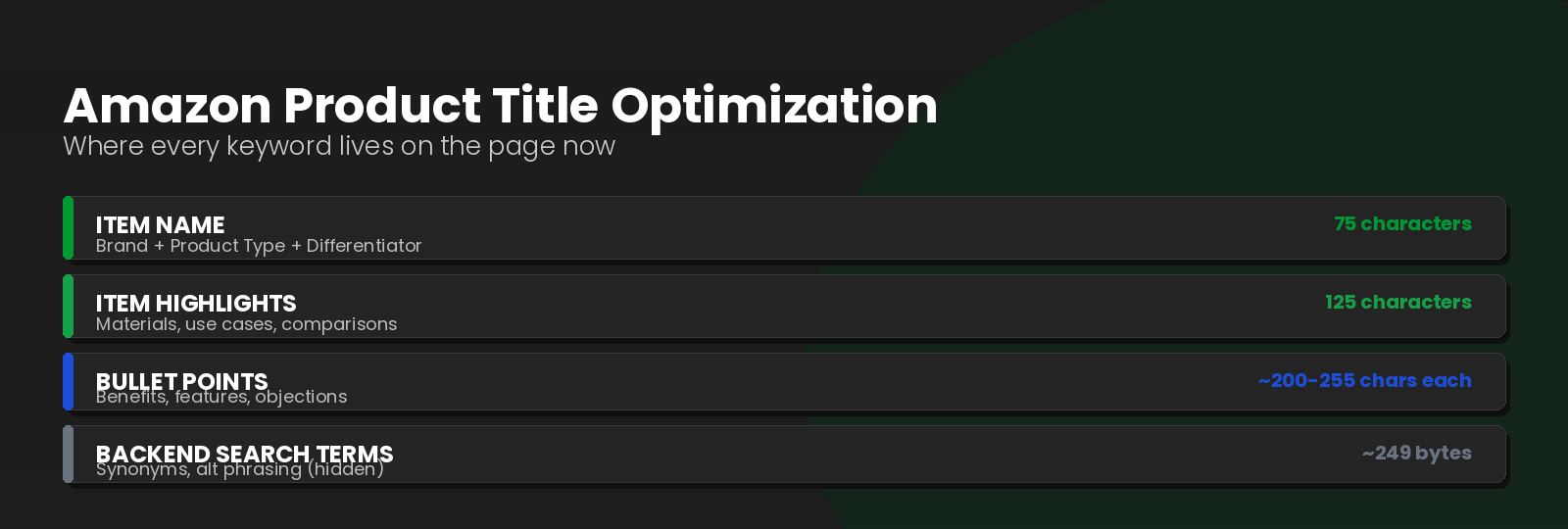
Amazon product title optimization was never really about the title alone — it was always about where each keyword sits across the whole page. The 75-character change just made that explicit. Here’s where content lives now.
| Field | Limit | What belongs here |
|---|---|---|
| Item Name (title) | 75 characters | Brand, product type, one differentiator — your strongest hook |
| Item Highlights | 125 characters | Materials, use cases, comparison details, secondary keywords |
| Bullet points | ~200–255 chars each | Benefits, features, objection handling — unchanged by this update |
| Backend search terms | ~249 bytes | Synonyms, misspellings, alternate phrasing — hidden from shoppers |
| Main image | N/A | Visual proof of anything the shortened title no longer states outright |
| A+ Content | Varies by module | Storytelling and comparison — increasingly where trimmed detail lands |
Nothing in that list besides the top two rows is new. But because the title now holds so much less on its own, every other field has to work slightly harder than it used to. Treat the page as one connected system rather than six separate fields to fill in isolation.
04Amazon Product Title Optimization: The Item Name Formula
The formula that consistently works, confirmed independently by our own catalog work and by Helium 10’s testing, is short: Brand, then Product Type, then one Differentiator. Stop as soon as the characters run out — don’t force a finished sentence into a space that doesn’t have room for one.
The Order Matters More Than the Words
Position inside the 75 characters is not neutral. Front-load your single best keyword phrase right after the brand name, not buried near the end. A phrase at the front of a title has always carried more weight for both ranking and the shopper’s eye than the same phrase near the close — that hasn’t changed just because the field got shorter.
Notice what stayed together: “French Press Coffee Maker” survives whole in the title rather than getting split. The capacity and the insulation claim, which shoppers actually compare products on, stay in the title too. Everything that supports the decision rather than defines the product moves to Highlights, where Amazon has now confirmed it carries equal search weight.
05Writing Item Highlights That Actually Rank
Item Highlights is not your bullet points, and it is not backend search terms. It’s a new, searchable, customer-visible field, and most sellers are still treating it as an afterthought. That’s a mistake, especially now that it displays on desktop as well as mobile.
- Keep converting phrases whole. If “waterproof hiking backpack” ranks for you, don’t let “waterproof” land in the title and “hiking backpack” land in Highlights. Move the entire phrase together, into whichever field has room for all of it.
- Front-load Highlights too. The field can visually truncate in some placements, so put your second-most-important phrase first, not last.
- Use it for comparison points. Materials, dimensions, what’s included, and use cases are exactly what Amazon says the field is designed for — and exactly what shoppers scan for once they’re already considering your listing.
- Don’t leave it blank. An empty Highlights field is 125 characters of search surface handed directly to a competitor who filled theirs in.
06Category-Specific Title Patterns
The Brand + Product Type + Differentiator formula holds across the board, but what counts as the differentiator changes completely depending on what you sell. A supplement buyer and a replacement-part buyer are scanning for entirely different things. Build a pattern per category once, then apply it across every ASIN in that category rather than improvising each time.
Patterns That Work by Category
| Category | Title pattern | Move to Item Highlights |
|---|---|---|
| Supplements | Brand + Ingredient + Strength + Count | Form, certifications, dietary flags, use case |
| Apparel | Brand + Gender + Garment + Key Feature | Fabric, fit, care, occasion |
| Home & Kitchen | Brand + Product + Size/Capacity + Material | Compatibility, cleaning, included items |
| Electronics | Brand + Product + Key Spec + Compatibility | Ports, standards, box contents, warranty |
| Auto Parts | Brand + Part + Fitment (Year/Make/Model) | OEM numbers, install notes, materials |
| Toys | Brand + Toy Type + Age Range + Piece Count | Skills developed, safety standards, themes |
| Pet Supplies | Brand + Product + Pet Size + Quantity | Materials, breed suitability, washability |
| Beauty | Brand + Product + Key Ingredient + Volume | Skin type, free-from claims, application |
07Variations, Parent and Child ASINs
Variation families are where most catalogs break under the new limit, because the 75-character cap applies to child titles as well as parents. A pattern that fits comfortably on the parent can overflow the moment you append a size or colour to each child.
- Budget backwards from your longest variant. If one child is “Extra Large Charcoal Grey,” that string has to fit. Write the shared portion of the title short enough that the longest variant still lands under 75, then apply that shared base to every child in the family.
- Keep phrasing identical across children. A parent saying “10-Pack” while a child says “Pack of 10” is a consistency signal Amazon reads across the family. Pick one form and use it everywhere.
- Don’t repeat the variation in Highlights. The variation attribute already displays through the selector. Use those 125 characters for something the shopper cannot see elsewhere.
- Check the live page, not just the submission. Variation titles frequently render differently on the customer-facing detail page than they appear in the editor. Confirm on the live listing before signing off a family.
08What the Major Tools Have Published
Two quick notes on where the largest Amazon tool providers stand, since sellers often ask whether their guidance differs from ours.
Helium 10 published a title-splitting guide in August 2026 and ran its own test against Amazon’s AI rewrites. Their finding was that the AI preserved close to 100% of individual keywords, but sometimes broke multi-word phrases apart — on one listing they examined, “coffin gift box” became simply “gift box.” Every word survived; the exact-phrase signal did not. They also confirmed that Item Highlights only unlocks once your title is already under 75 characters, and that they are still testing whether a keyword carries equal weight in each field. Their Listing Builder now includes both fields.
Jungle Scout has not published dedicated coverage of the July 27 update as of this writing. Their existing keyword-position research remains relevant though: titles carrying the primary keyword within the first 80 characters have consistently outperformed titles where it sits later, which is exactly the front-loading behaviour the 75-character limit now enforces by default.
09Six Mistakes That Quietly Cost Rankings
These are the errors we see most often when auditing catalogs after a title rewrite. None of them look like mistakes at a glance, which is exactly why they persist.
The single most common and most expensive error. “Stainless steel water bottle” broken into “stainless steel” in the title and “water bottle” in Highlights keeps every word but destroys the exact-phrase match. Search your top three converting phrases and confirm each one survives whole in a single field.
Seventy-five is a ceiling, not a target. Adding a weak keyword just to fill space dilutes the phrases that matter and makes the title harder to scan. If your product is clearly identified at 62 characters, stop at 62.
Highlights is now customer-visible on both desktop and mobile. Repeating it verbatim in bullet one wastes a bullet and gives the shopper nothing new. Let the highlight state the fact and the bullet explain why it matters.
Process Mistakes, Not Copy Mistakes
If your brand attribute reads “XYZ Trading Co. Ltd,” every AI-assisted rewrite across your catalog inherits that suffix. Shoppers search the brand, not the legal entity. Correct this through Brand Registry before touching individual titles.
A single bulk push across hundreds of ASINs gives you no way to isolate what worked. Move in controlled batches by revenue tier, measure for two weeks, then apply what you learned to the next batch.
Amazon has confirmed the rollout continues gradually through the rest of 2026. A listing you optimized in August can still be flagged and rewritten in November if something falls out of compliance. This is a recurring check, not a one-time project.
10Rebuilding Bullets, Backend Terms, and Images
A shorter title changes what the rest of the page needs to do. Three areas deserve a second look once your title and Highlights are locked in.
Backend Search Terms Are Unchanged, But Easy to Get Wrong
This field is still measured in bytes, not characters, with a limit around 249 bytes. Accented characters and some symbols cost more than one byte each, and going a single byte over silently de-indexes the entire field with no warning. If you’re moving keywords out of a long title, count carefully before you paste them into backend terms.
Your Main Image Now Carries More Weight
Specifications that used to sit in a long title — pack count, dimensions, what’s included — are exactly the details a shopper scanning search results can no longer see if they were trimmed. A main image or the first supporting image showing quantity or scale directly compensates for that lost information, and it’s one of the fastest fixes available if a title rewrite has already gone live.
Bullet Points Should Cross-Reference, Not Repeat
Since Item Highlights is now a customer-visible field similar in spirit to a bullet, avoid simply duplicating it word for word in your first bullet point. Use bullets to expand on the benefit behind each Highlight instead — the highlight states the fact, the bullet explains why it matters.
TOOLFree GlancePeak Tools for This Work
You do not need a paid subscription to do most of this properly. We built a set of free tools that cover the specific jobs Amazon product title optimization actually requires — drafting compliant copy, mining the keyword phrases worth protecting, and checking whether the numbers still work after a change. No signup, no trial, no card.
Start with these three
These are the tools that map directly onto the workflow in this article, in the order you would use them.
Also Useful After a Title Change
A title rewrite moves more than rankings. Because Sponsored Products auto campaigns match partly on title content, your ad economics shift for a few weeks afterwards while the algorithm re-learns which queries fit your listing. These three tools cover that side of it.
11Your Optimization Checklist
- Confirm your title is under 75 characters. Until it is, Item Highlights stays locked, so this is always step one.
- Apply the formula. Brand, Product Type, one Differentiator — front-loaded, in that order, for every Item Name.
- Fill Item Highlights deliberately. Materials, use cases, and comparison points, with your second-strongest phrase leading.
- Check for split phrases. Open the Enhance Listing panel and confirm no converting multi-word phrase got broken across the two fields.
- Recount backend search terms. Anything moved out of the old title needs a byte count, not a character count.
- Update your main image if specs were cut. Quantity, size, and what’s included belong somewhere visible if the title no longer states them.
- Track impressions and CTR for 3 weeks. That’s roughly how long PPC search term drift takes to stabilize after a title change.
What Monitoring Actually Looks Like
The comparison view in Seller Central’s sales dashboard is the fastest way to separate a real title problem from ordinary week-to-week noise. Set the range to the last 30 days and switch on Compare dates — you get your current period plotted against both the same window last month and the same window last year.
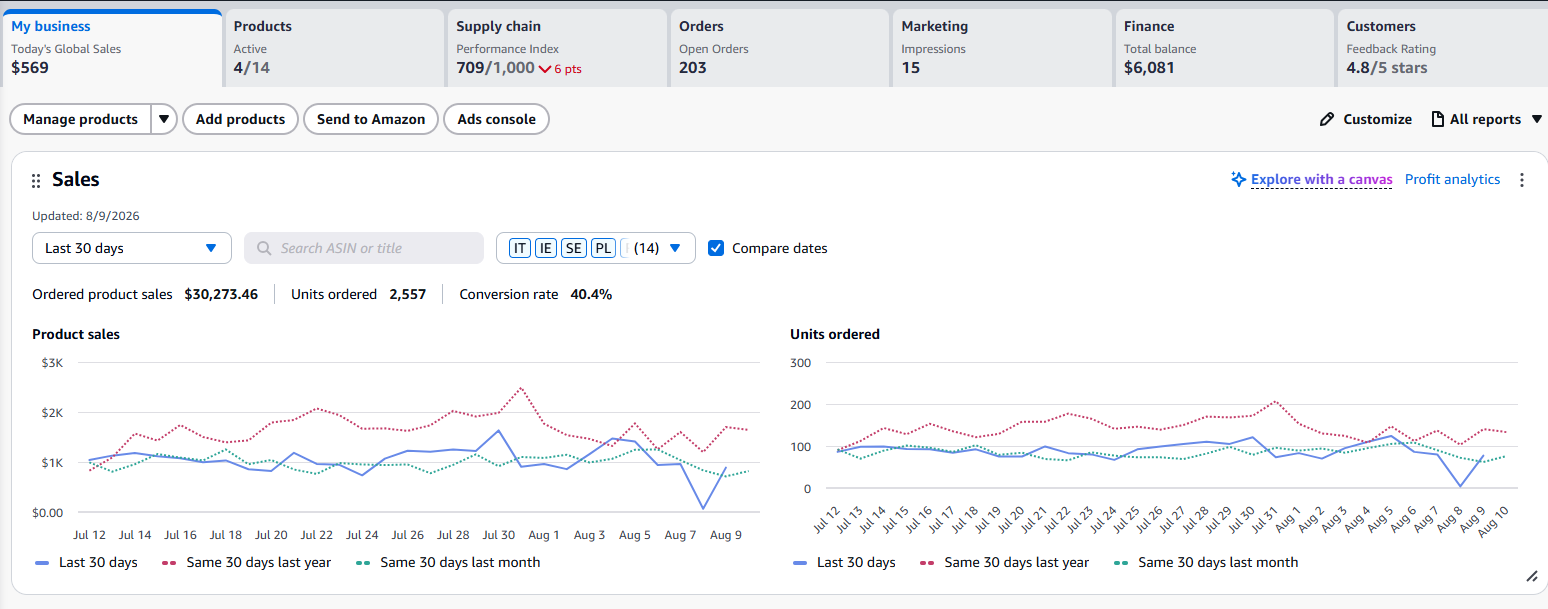
Read it in that order. If your line tracks its own history and only the absolute numbers moved, that’s category seasonality and your title is fine. If your line diverges from both comparison periods starting the week a rewrite went live, that’s the title, and it’s worth opening the Enhance Listing panel to see which phrase got broken. Conversion rate is the more reliable signal here than raw sales, since it strips out traffic volume and isolates whether the listing still persuades the people who reach it.
Want Your Titles Optimized, Not Just Compliant?
GlancePeak’s free GP Account Score reviews your Item Name, Item Highlights, and the rest of your listing against this exact formula — and tells you which ASINs to fix first. Delivered within 48 hours.
Book Your Free Listing Audit → Send Us a Message