Free Tools Partner Program Blog About
Home
🇺🇸 United States Walmart Wayfair eBay iHerb Chewy Reverb 🇨🇦 Canada Amazon Canada Best Buy Canadian Tire Well.ca 🇬🇧 United Kingdom Amazon UK OnBuy Argos Boots Pets at Home AO.com 🌙 Middle East Noon Namshi Mumzworld Pet Corner UAE
How It Works Results Pricing
🛠 Free Tools 🤝 Partner Program 📖 Blog About Get Free Audit →
Amazon 28 min read

Amazon Is Rewriting Your Product Titles: Inside the 75 Character Title Update, the New Item Highlights Field, and What It Means for Your Listing SEO

Amazon Is Rewriting Your Product Titles: Inside the 75 Character Title Update, the New Item Highlights Field, and What It Means for Your Listing SEO
Amazon 75-Character Title Limit: What Changes July 27, 2026
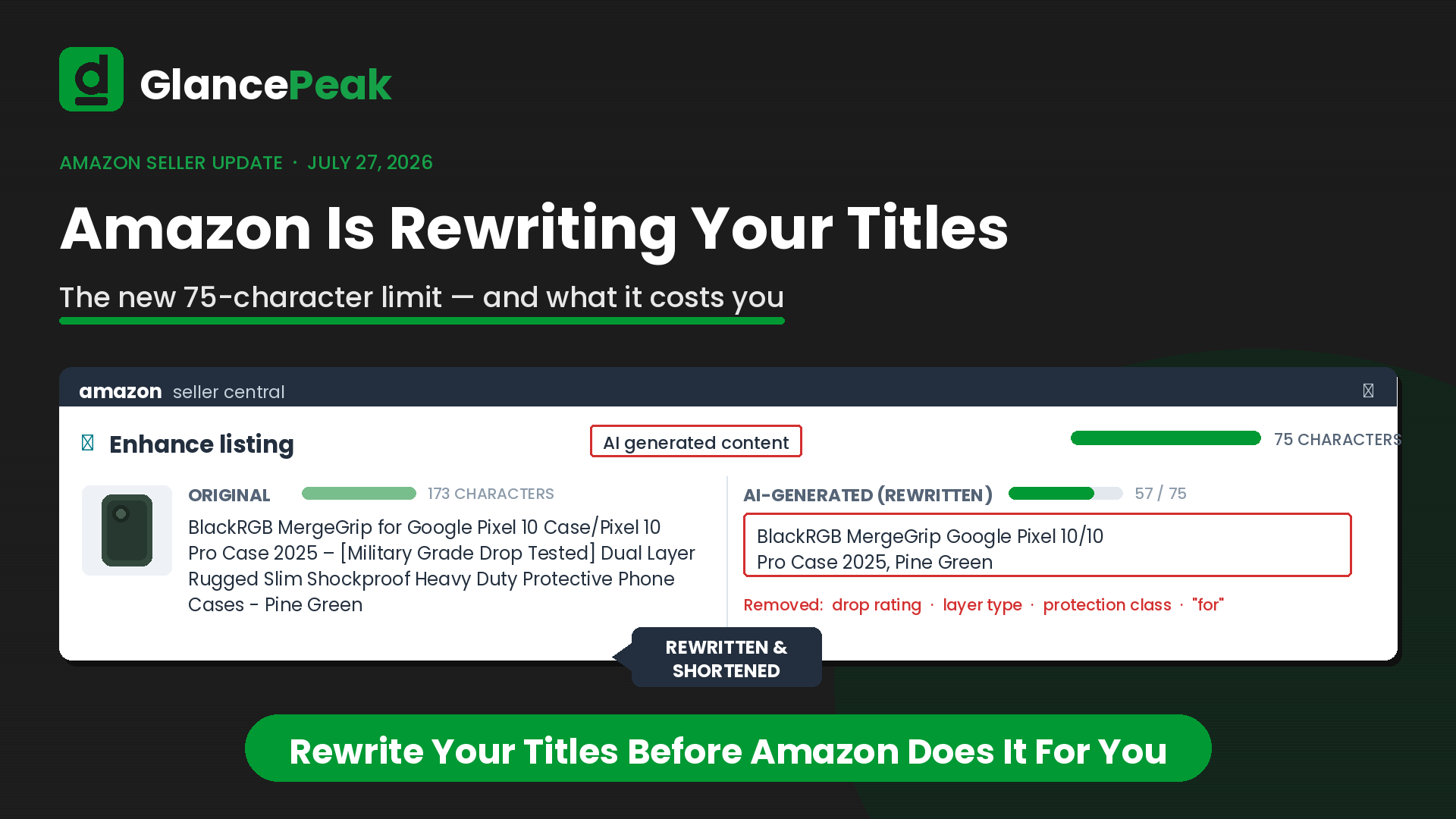
Why this update is different: From July 27, 2026, product titles in every category except media must be 75 characters or fewer. A new Item Highlights field adds 125 searchable characters. And Amazon is not waiting for sellers to comply — AI-written replacement titles are already staged inside the Enhance Listings section of Seller Central, and after the deadline, over-limit titles get swapped for the AI version gradually and automatically.

In plain English: the 200-character title playbook is dead. If you do not rewrite your titles on your terms, Amazon’s AI will rewrite them on its terms.

CoversWhere the change appears in Seller Central with live screenshots, a real AI rewrite examined character by character, the SEO consequences, and a pre-deadline action plan.
ForAmazon sellers, brand owners and catalog managers with titles over 75 characters — which today is almost everyone.
TakeawayAn accepted AI suggestion becomes permanent, customer-facing content. Review it like you wrote it — because to the customer, you did.

01What Changes on July 27, 2026

Amazon announced this update in early June 2026, and the mechanics are simple enough. Three things happen at the same time.

75Maximum title characters, spaces included, in every category except media
+125New Item Highlights field — searchable, and shown with titles in search results
AUTOAfter July 27, over-limit titles are gradually replaced with Amazon’s AI version

Amazon’s reasoning is mobile display. A shorter title fits on a phone screen without truncating, and it lines up with how titles work on most other online stores. Item Highlights is meant to be the pressure valve — the place where materials, use cases and specifications go once they no longer fit in the title. Amazon says the field is searchable and shows up alongside titles in search results and on product detail pages.

That is the official version. The part that matters more to sellers is how it gets enforced.

This Policy Does Not Wait for You Most Amazon policy changes sit there until you act. This one does not. Amazon has built the enforcement directly into Seller Central, and it is already loaded with AI-generated replacements for your titles. That is what the Enhance Listings section is — a queue of rewrites waiting to go live.

02Where to Find It in Seller Central

The rollout is already live in seller accounts. The screenshots below come from a real UK seller account reviewed in July 2026 and shared with the brand’s permission. Here is the exact path to follow in your own account.

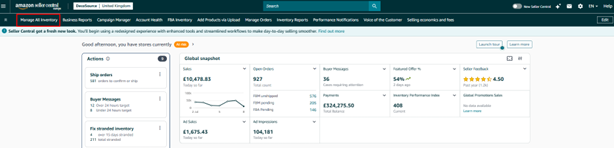
Step 1 — Open Manage All Inventory

From the Seller Central home page, open Manage All Inventory in the main navigation. Everything else lives inside it.
Step 1
Amazon Seller Central home page with Manage All Inventory highlighted in the main navigation menu
Seller Central home — Manage All Inventory sits in the main menu bar.

Step 2 — Find the Enhance Listings Tab

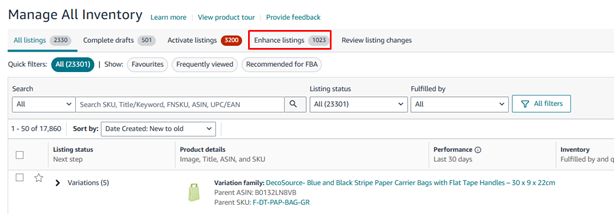
Inside Manage All Inventory there is a tab that did not exist before: Enhance Listings, sitting between Activate Listings and Review Listing Changes, with a live counter beside it. In this account, 1,023 listings already have AI-generated content staged and waiting.
Step 2
Manage All Inventory tab bar in Amazon Seller Central showing the new Enhance Listings tab with 1,023 queued listings
The Enhance Listings tab — 1,023 listings already queued in this account.

Step 3 — Open the Queue and See What Is Flagged

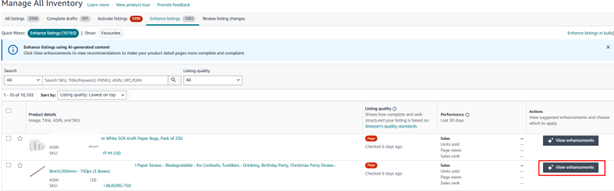
Open the tab and Amazon shows you a graded queue. Every listing gets scored against Amazon’s listing quality standards, sorted worst-first, with “Poor” flags marked in red. One quick filter in this account surfaces 10,193 listings with staged AI changes. Each row has a View enhancements button that opens the review panel for that ASIN.
Step 3
Amazon Enhance Listings queue showing listing quality flags, performance data and View enhancements buttons across 10,193 flagged listings
The Enhance Listings queue — quality flags on the left, View enhancements on the right.

Step 4 — Review the AI Content Against Your Original

This is where the update stops being abstract. The Enhance Listing panel puts Amazon’s AI-generated content on the left and your original on the right, with “Show original” toggled on. Two fields carry the weight.

  • Item Name — the AI’s replacement title, ready to overwrite yours the moment it is applied.
  • Item Highlight — a field your listing never had. Amazon fills it with the keywords it pulled out of your title.

There is also an Accept all checkbox that applies every AI change in a single click. Convenient, and exactly how unreviewed mistakes end up live on your detail pages.
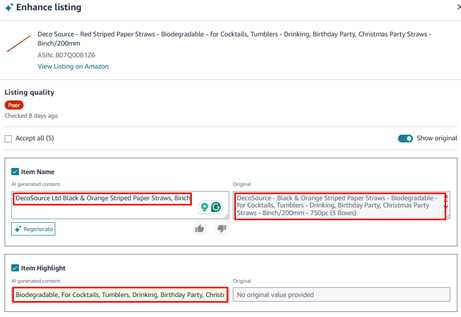
Step 4
Amazon Enhance Listing review panel comparing the AI-generated Item Name and Item Highlight against the seller's original product title
The Enhance Listing panel — AI-generated Item Name and Item Highlight on the left, the original title on the right.
Worth Knowing Both fields in that panel are editable. You are not choosing between “accept Amazon’s version” and “do nothing” — you can rewrite the draft in the box before applying it. That middle option is the one most sellers miss, and it is usually the right one.

03A Real AI Rewrite, Broken Down

The ASIN in that panel is a pack of striped paper straws. Here is what the AI did to it, character for character.

Original Title 173 characters “DecoSource – Black & Orange Striped Paper Straws – Biodegradable – for Cocktails, Tumblers – Drinking, Birthday Party, Christmas Party Straws – 8inch/200mm – 750pc (3 Boxes)”
AI Rewrite 57 characters “DecoSource Ltd Black & Orange Striped Paper Straws, 8inch”
New Item Highlight “Biodegradable, For Cocktails, Tumblers, Drinking, Birthday Party, Christ…”

Three things happened in that rewrite. Each one is a problem on its own.

1. “Ltd” Got Pulled Into the Brand Name

The AI took the registered legal entity name — DecoSource Ltd — straight from the brand attribute and put it in the title. That is four characters of your seventy-five spent on a suffix no shopper has ever typed into the search bar.

2. The Pack Count Disappeared Completely

“750pc (3 Boxes)” is gone from the new title, and gone from the Item Highlight too. A shopper scanning search results can no longer see the quantity anywhere — on a product where quantity is the buying decision. That pushes the burden onto your main image instead. Two people comparing straw multipacks now see two listings that look identical.

3. Every Keyword Moved to an Untested Field

Biodegradable, plus all five use-case keywords, moved out of the most heavily weighted indexing field on Amazon and into a brand-new field whose ranking weight nobody has data on yet. And the Highlight itself is truncated mid-word, so some of those keywords may not even display in full.

The Brand Attribute Problem Is Bigger Than It Looks The “Ltd” injection is not a one-off glitch. The AI uses whatever sits in your brand attribute, word for word. If yours holds a full legal entity — “XYZ International Trading Co. Ltd” or “Something Something GmbH” — a long legal name can eat 30 to 40 of your 75 characters before you reach a single keyword. And because the same brand value feeds every rewrite across your catalog, one wrong attribute quietly damages hundreds or thousands of listings at the same time. It also breaks brand search consistency: shoppers search “DecoSource,” not “DecoSource Ltd.”
Fix This First Audit the brand attribute on every parent ASIN before July 27, and correct legal-entity values to the customer-facing brand through Brand Registry. Do this before anything else, so that every rewrite — yours or Amazon’s — starts from the right name.

04What This Does to Your Amazon SEO

The title has always been Amazon’s most heavily weighted indexing field. Squeezing it to 75 characters, and letting an AI pick what survives, creates four problems that compound.

  • Keywords land somewhere unproven. Terms pushed out of the title end up in Item Highlights. Amazon says the field is searchable, but its ranking weight is untested and no seller has historical data on it yet. Treat every keyword you depend on as at risk until you can see otherwise in your own search query performance data.
  • Click-through takes a hit. Pack sizes, counts and key specs stripped out of titles make competing listings look interchangeable in search results. Less differentiation means fewer clicks — and missing quantity information leads to wrong-item orders and returns you then have to process.
  • Established ASINs can lose ground. A title rewrite reshuffles indexed terms and relevance signals that took years to build. Do that across every non-compliant SKU at once and you no longer have a formatting change, you have a ranking event.
  • Rufus and AI search matter here. Amazon’s Rufus shopping assistant leans on structured, specific content. A deliberate, benefit-led Item Highlight gives you a brand-new surface to be found on. An auto-generated, truncated one wastes it. This is one of the few genuine upsides in the update, and only sellers who write the field themselves will get it.
The Way to Think About It This is not really a character-count problem. It is a forced re-prioritisation of every keyword in your catalog. The 75 characters you keep are a statement about what your product is; the 125 in Item Highlights are the supporting detail. Sellers who approach it that way come out with cleaner listings than they had before — and are better placed for AI-driven shopping surfaces generally.

05The Operational Problems Nobody Is Talking About

  • The replacement is silent. After July 27, non-compliant titles get swapped gradually. If nobody on your team is watching the Review Listing Changes tab, you might not spot a rewrite for weeks — until a sales dip makes you go looking.
  • Big catalogs cannot be reviewed by hand. The account in these screenshots has 10,193 flagged listings. At two minutes per review that is roughly 340 hours of clicking. Catalogs at this scale need a prioritised system built around revenue at risk, not a checkbox marathon — which is exactly what full account management exists to handle.
  • The bulk tooling is not ready yet. Sellers are already reporting “attribute currently unsupported” errors when trying to set Item Highlight through flat files and the API. If your operation runs on bulk workflows, test them now rather than on deadline day.
  • Variations and spec-heavy categories are the hardest. Parent and child titles, bundles, and categories where the title carries sizing, materials, edition or fitment data — toys, industrial supplies, art materials — do not compress neatly into 75 characters. Build a title pattern per category instead of improvising ASIN by ASIN.
  • Your ad copy assumptions change too. Sponsored Brands headlines, storefront copy and A+ modules were often written to complement a long title. When the title loses its detail, those assets are carrying more weight than they were designed for.

06Your Action Plan Before the Deadline

  1. Export and flag. Pull the full catalog and flag every title over 75 characters. Sort that list by revenue — that is your work queue, in order.
  2. Fix brand attributes first. Correct legal-entity brand values through Brand Registry before you touch a single title, so nothing downstream starts from a broken name. This is core catalog management work.
  3. Write the titles yourself. Lead with the main keyword, the product type, and one differentiator inside the 75 characters. On products where quantity or size drives the purchase, keep it in the title — the AI will not.
  4. Treat Item Highlights as real copy. Use the 125 searchable characters for materials, counts and use cases. Front-load the most important terms, since the field truncates in display. Our free Listing Builder can draft compliant copy to start from.
  5. Check your work in search. After a rewrite goes live, search your own key terms and confirm the listing still indexes and still reads clearly on a phone.
  6. Monitor weekly after go-live. Watch Review Listing Changes and the Enhance Listings queue every week, and track impressions, click-through rate and rank on every rewritten ASIN for at least a month.
Rule of Thumb An accepted AI suggestion becomes permanent, customer-facing content. Review it like you wrote it — because as far as the customer is concerned, you did.

The Deadline Is Real. The Queue Is Already Loaded.

Amazon has never enforced a title change with a built-in AI replacement engine before. Sellers who treat July 27 as a formatting deadline will wake up to rewritten titles and reshuffled rankings they did not choose.

GlancePeak’s free GP Account Score reviews your title risk, brand attributes and Item Highlights readiness — and tells you exactly what to fix and in what order. Delivered within 48 hours.

Book Your Free Title Audit → Send Us a Message

Frequently Asked Questions About the Amazon Title Update

What is Amazon’s new 75-character title limit?+
From July 27, 2026, Amazon requires product titles in every category except media to be 75 characters or fewer, including spaces. This replaces the 200-character titles most sellers have been using for years. Amazon’s stated reason is mobile display — a shorter title fits on a phone screen without truncating.
When does the Amazon title length update take effect?+
The 75-character limit takes effect on July 27, 2026. Amazon announced it in early June 2026. AI-generated replacement titles are already staged inside the Enhance Listings section of Seller Central ahead of the deadline, and will be applied gradually and automatically after it passes.
What is the Item Highlights field on Amazon?+
Item Highlights is a new searchable field that gives sellers 125 extra characters alongside the title. Amazon intends it to hold the materials, use cases and specifications that no longer fit inside a 75-character title, and says it appears with titles in search results and on product detail pages.
Will Amazon change my product titles automatically?+
Yes, if you do nothing. After July 27, 2026, titles longer than 75 characters are gradually replaced with Amazon’s AI-generated version. Sellers can review and edit the suggestions early inside the Enhance Listings tab, or allow the automatic replacement to proceed unsupervised.
How do I find the Enhance Listings tab in Seller Central?+
Open Manage All Inventory from the Seller Central main menu. Enhance Listings sits in the row of tabs at the top, beside All Listings and Activate Listings, with a counter showing how many of your listings already have AI-generated content staged and waiting for review.
Why did Amazon’s AI add “Ltd” to a product title?+
The AI copies the brand value straight from your brand attribute. If that attribute holds a full legal entity name rather than the customer-facing brand, the legal suffix is carried into the new title word for word, spending characters on text no shopper ever types into search.
How does the 75-character title limit affect Amazon SEO?+
The title is Amazon’s most heavily weighted indexing field. Shortening it pushes keywords into the untested Item Highlights field, makes competing listings look more alike in search results which lowers click-through rate, and can reset relevance signals that established ASINs spent years building.
Do Amazon titles still need the pack count?+
Amazon’s AI rewrite does not guarantee the pack count survives. In the example documented in this article, the quantity disappeared from both the new title and the new Item Highlight, removing it from search results entirely on a product where quantity drives the purchase decision.
Can I edit Amazon’s AI title suggestion before accepting it?+
Yes. The Item Name and Item Highlight fields inside the Enhance Listing panel are editable text boxes, so you can rewrite the AI draft before applying it. Editing the suggestion is almost always better than accepting it as written or letting automatic replacement decide for you.
What should sellers do before the July 27 deadline?+
Export the catalog and flag every title over 75 characters, fix legal-entity brand attributes through Brand Registry first, rewrite titles manually rather than accepting the AI version, write Item Highlights deliberately, and monitor the Enhance Listings queue and rankings weekly after go-live.

GlancePeak Editorial Team
Amazon Ads Verified Partner · Amazon Growth Agency
GlancePeak is an Amazon Ads Verified Partner agency managing $105K+ in monthly ad spend across 150+ active brands on Amazon, Walmart, and eBay. Our specialists review every AI output before it reaches a live listing.

Title policy details confirmed via the Amazon Seller Central announcement “Updates to improve your product titles begin on July 27” (June 2026) and Amazon Seller Forums. Screenshots from a live Seller Central account review, July 2026, shared with the account owner’s permission. Reviewed July 24, 2026.

glancepeak

glancepeak

Amazon PPC and account management expert at GlancePeak. Helping sellers scale profitably across Amazon and beyond.